Unlocking Creativity: A Complete Guide to Floral Monogram and Circle Frame Digital Assets
In the vibrant world of digital crafting and personalized design, few elements possess the timeless elegance and versatility of floral monogram frames and circle frames. Whether you are a seasoned graphic designer, a small business owner creating custom merchandise, or a hobbyist exploring the capabilities of a new cutting machine, these decorative assets serve as the foundational building blocks for countless creative projects. Understanding how to acquire, manage, and utilize these digital files is essential for transforming simple ideas into professional-quality finished products.
This guide explores the practical application of floral and circular frame designs, demystifies the technical file formats included in standard digital bundles, and outlines the best practices for both personal creativity and commercial product development. By mastering these resources, you can elevate your scrapbooking, apparel customization, and digital printing endeavors with confidence and precision.
The Enduring Appeal of Floral and Circular Frames
Frames have been used in art and design for centuries to draw the eye, create focus, and add ornamental beauty. In the digital age, floral monogram frames and circle frames have evolved from static printed borders into dynamic, scalable vector assets. Their significance lies in their ability to instantly soften a design, add a touch of organic sophistication, and provide a structured space for text or imagery.
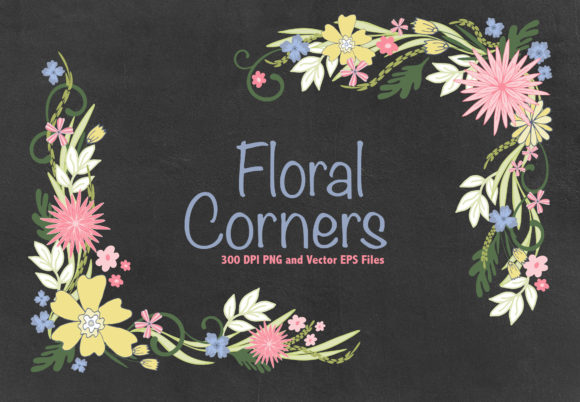
Floral frames, in particular, bridge the gap between traditional botany and modern typography. They are exceptionally popular for weddings, baby showers, and feminine branding because they convey warmth and natural beauty. Circle frames, on the other hand, offer geometric balance. They are ideal for logos, badges, stickers, and social media profile pictures where symmetry and containment are necessary. When combined, these elements allow creators to produce intricate, layered designs that would be incredibly time-consuming to draw from scratch.
Versatility Across Mediums
The true power of these digital assets is their cross-platform utility. Unlike physical stencils or pre-printed paper, digital frames can be adapted for virtually any medium:
- Wall Decoration: Create large-scale vinyl decals or framed prints that serve as focal points in living spaces.
- Apparel Customization: Use heat transfer vinyl (HTV) or direct-to-garment printing to place monograms on t-shirts, tote bags, and denim jackets.
- Paper Crafting: Enhance handmade greeting cards, wedding invitations, and scrapbook layouts with precise, clean lines.
- Digital Products: Incorporate frames into editable templates for clients who need instant, professional branding.
Understanding Your Digital Bundle: Formats and File Management
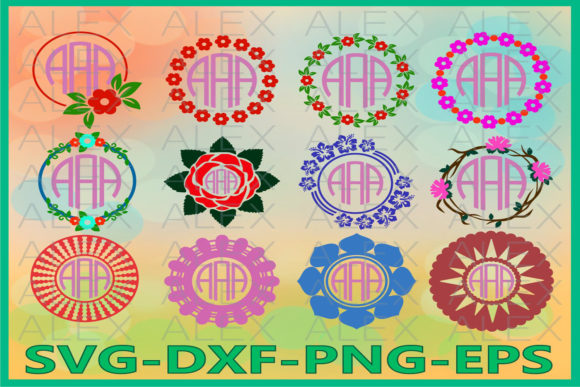
When you acquire a high-quality digital asset pack, you typically receive a comprehensive bundle designed to ensure compatibility across various software and hardware ecosystems. A standard premium collection often includes 12 unique files, providing ample variety for diverse projects. However, receiving these files in a zip archive requires a specific initial step before creation can begin.
The Importance of Unzipping
Digital assets are compressed into ZIP archives to reduce file size for downloading and to keep multiple formats organized in a single package. You must unpack these files before use. Attempting to open an SVG or DXF file directly from within the zipped folder will often result in errors or missing data in your design software. Always extract the entire folder to your computer’s hard drive or cloud storage first. This ensures that linked files remain intact and that your cutting software can read the vector paths correctly.
Decoding File Formats: SVG, DXF, EPS, AI, and PNG
Each format included in your bundle serves a distinct purpose. Understanding when to use which file is crucial for achieving professional results:
- SVG (Scalable Vector Graphics): The gold standard for cutting machines like Cricut and Silhouette. SVGs retain individual layers and cut lines, allowing the machine to distinguish between score lines, cut lines, and print areas. They scale infinitely without losing quality.
- DXF (Drawing Exchange Format): Primarily used for CAD software and older versions of cutting machine software. If your machine does not support SVG natively, DXF is the universal vector alternative.
- EPS (Encapsulated PostScript): Ideal for professional design software like Adobe Illustrator or CorelDRAW. EPS files preserve complex vector data and are preferred for commercial printing and large-format signage.
- AI (Adobe Illustrator): The native source file for industry-standard vector editing. Use this format if you need to modify the anchor points, change colors, or reshape the floral elements themselves.
- PNG (Portable Network Graphics): A raster image with a transparent background. While not suitable for cutting vectors, PNGs are perfect for sublimation printing, digital planners, web graphics, and mockups where vector editing is not required.
Practical Applications: From Cutting Machines to Commercial Design
Owning the files is only the beginning; applying them effectively requires understanding your tools and your goals. These images are engineered to be cut on any cutting machine, provided your specific hardware and software are compatible. Always perform a test cut with a new design to verify that line weights and intricate floral details translate well to your chosen material.
Personal Projects and Hobbyist Crafting
For the home crafter, these frames unlock endless possibilities. Imagine creating a set of personalized wine glasses for a bridal party using a delicate floral circle frame. The SVG file allows you to weed away the negative space easily, leaving a pristine lace-like pattern on the glass. Similarly, scrapbookers can layer PNG frames over photographs in digital albums or print EPS versions to use as physical overlays on textured cardstock. The availability of 12 distinct designs means you can create cohesive collections—such as a matching invitation, thank-you card, and gift tag set—without searching for additional assets.
Commercial Use and Product Creation
For entrepreneurs, these assets represent significant value. You can create and sell physical products like custom mugs, apparel, and decals. Furthermore, you can develop digital products such as editable wedding invitation templates or social media kits. However, commercial use comes with ethical and legal responsibilities regarding intellectual property.
Critical Licensing Guideline: When selling items featuring these frames, the design must be transformed. You may incorporate the images into a new design for sale (e.g., a mug with a monogram inside the frame), but original image files cannot be extracted or resold as standalone assets. This means you cannot simply upload the raw SVG to a print-on-demand site or sell the unaltered vector file. The value must come from your unique composition, text integration, and end-product utility. This protection ensures that designers continue to create high-quality resources while allowing makers to build sustainable businesses.
Tips for Maximizing Design Quality
To get the most out of your floral monogram and circle frame collection, consider these best practices:
- Layering: Combine a circle frame with a floral accent to create depth. Use contrasting colors or materials (e.g., glitter vinyl for flowers, matte vinyl for the frame) to make the design pop.
- Typography Pairing: Floral frames pair beautifully with script fonts, while circle frames often suit bold sans-serif or serif typefaces. Ensure the text fits comfortably within the frame’s safe zone to prevent cutting errors.
- Color Management: If using PNGs for sublimation, remember that screen colors differ from print colors. Always convert to CMYK if possible or use color profiles specific to your printer to maintain the vibrancy of the floral details.
- Organization: After unzipping, rename files descriptively (e.g., "Rose_Circle_Frame_Large.svg") rather than keeping generic filenames. This saves valuable time during future projects.
Building a Broader Creative Foundation
Integrating floral monogram frames and circle frames into your workflow is about more than just decoration; it is about learning the language of digital design. By working with multiple file formats, understanding vector scalability, and navigating licensing terms, you build a robust skill set that applies to all areas of digital creation. These assets serve as an accessible entry point to complex design concepts, making professional aesthetics achievable for beginners while providing efficient resources for experts.
Whether you are preparing for a craft fair, designing your own wedding stationery, or simply enjoying a weekend of creative exploration, these 12 versatile files offer a gateway to polished, personalized expression. Remember to always respect the technical requirements of your equipment and the licensing terms of the creator. With the right knowledge and tools, your digital asset library becomes an inexhaustible source of inspiration and opportunity.